Side-by-Side Workflow
We will now demonstrate the end-to-end LightningSim workflow with a Vitis HLS project implementing a simple matrix multiplication kernel. This example is derived from Kastner et al.'s excellent Parallel Programming for FPGAs book.
Walkthrough
Step 1. Launch the Vitis HLS 2021.1 GUI by running:
vitis_hls >/dev/null &
(The trailing & runs the process in the background, and >/dev/null suppresses the terminal output.)
Step 2. Click the Open Project link. Navigate to lightningsim-doc/examples/example-1 and click Open to open the project.
Notice that the project has already been set up with a source file matrixmultiplication.cpp as well as testbench files matrixmultiplication-top.cpp and matrixmultiplication.gold.dat. These are the key ingredients for developing designs in Vitis HLS.
Step 3. Before we synthesize this design, let’s launch LightningSim to see how it works seamlessly side-by-side with Vitis HLS.
In the terminal in which you activated the lightningsim conda environment, run:
lightningsim --gui lightningsim-doc/examples/example-1/solution1
Note
Make sure you always use the full path to the project solution, not just the path to the project itself!
LightningSim will start in GUI mode and print the URL to the LightningSim server: http://127.0.0.1:8080. Hold Ctrl and click the link in the terminal to open the LightningSim UI in your default browser.
By default, LightningSim will wait for you to start a synthesis run before running simulation. Arrange the windows so that you can see both Vitis HLS and LightningSim side-by-side.
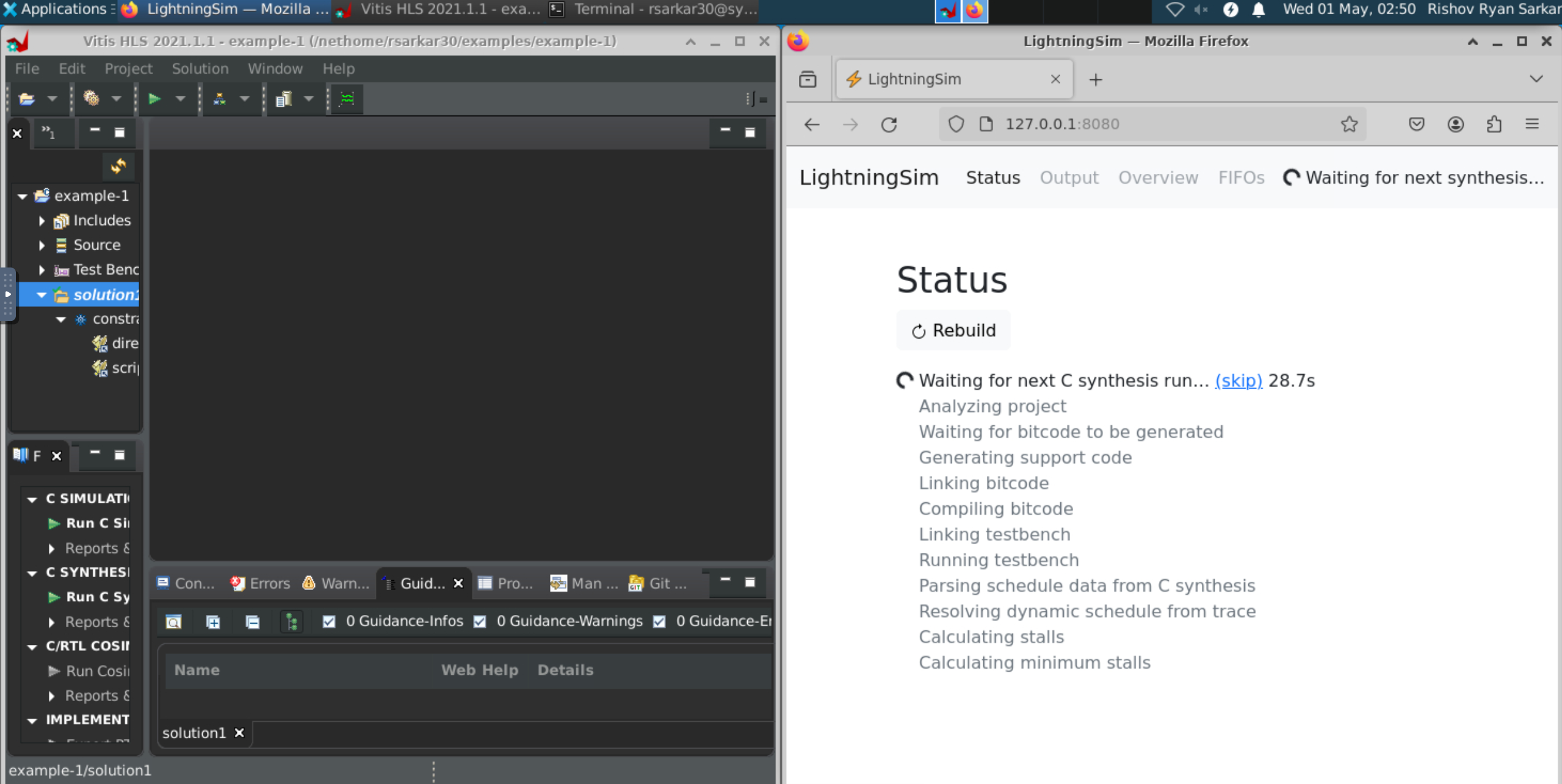
Step 4. Within the Vitis HLS toolbar, click the green play button to start C synthesis. Confirm the default settings by clicking OK to start the synthesis process.
Wait for synthesis to complete. Notice LightningSim automatically starts simulation a few seconds into the synthesis process.
Step 5. As soon as synthesis is complete, click the down arrow next to the green play button, and select Co-Simulation to start C/RTL cosimulation.
Wait for both cosimulation and LightningSim to complete. Which completes first? By how much?
Step 6. Navigate to the Output tab of LightningSim and observe the testbench output. Did the simulated testbench pass? Does this match the cosimulation status?
Step 7. Navigate to the Overview tab of LightningSim. Are the reported latencies the same between LightningSim and cosimulation?
Step 8. Our kernel is apparently taking 32,771 cycles to complete during this simulation. Let’s see if there are any easy ways to extract more performance from this design.
Within Vitis HLS, in the project hierarchy, expand Source and double-click the source file matrixmultiplication.cpp to see the kernel code for this design.
Step 9. It appears that the product loop is being pipelined with an II = 1. Let’s see how moving the PIPELINE directive outside the product loop into the col loop impacts the performance.
Move the directive #pragma HLS PIPELINE II=1 on line 15 to line 12, and save the file.
Step 10. Prepare LightningSim for another simulation run. Switch back to the Status tab in LightningSim, and click the Rebuild button.
LightningSim starts waiting for the next run of HLS synthesis.
Step 11. Re-synthesize the design in Vitis HLS by clicking the green play button in the toolbar. Wait for synthesis and LightningSim to complete. Did the performance improve?
Step 12. When you are finished with this example, close the Vitis HLS project by selecting File > Close Project…. Stop LightningSim by returning to the terminal you launched it from and interrupting the process with Ctrl + C.
Recap
In this example, you saw how to run LightningSim on a Vitis HLS project and use it within a development workflow. However, you may have noticed that this example was simple enough that simulation was not necessary—the HLS report itself already provided a very close estimate of the cycle count.
In the next examples, we will see that this is not always the case. In these cases, LightningSim can help significantly improve the HLS development process.